Cybercriminals are adopting specially crafted URLs to trick users into entering their Gmail credentials in a new sophisticated phishing campaign.
Security experts discovered a new effective Gmail phishing attack that is able to deceive also tech-savvy people. Crooks leverage on specially crafted URLs to trick victims into providing their Gmail credentials on a phishing page.
The malicious messages are sent from one of the victim’s contacts and pretend to carry a PDF document that can be previewed directly from Gmail. When the victim clicks on the “attachment” image included in the body of the message it is redirected to a Gmail phishing page.
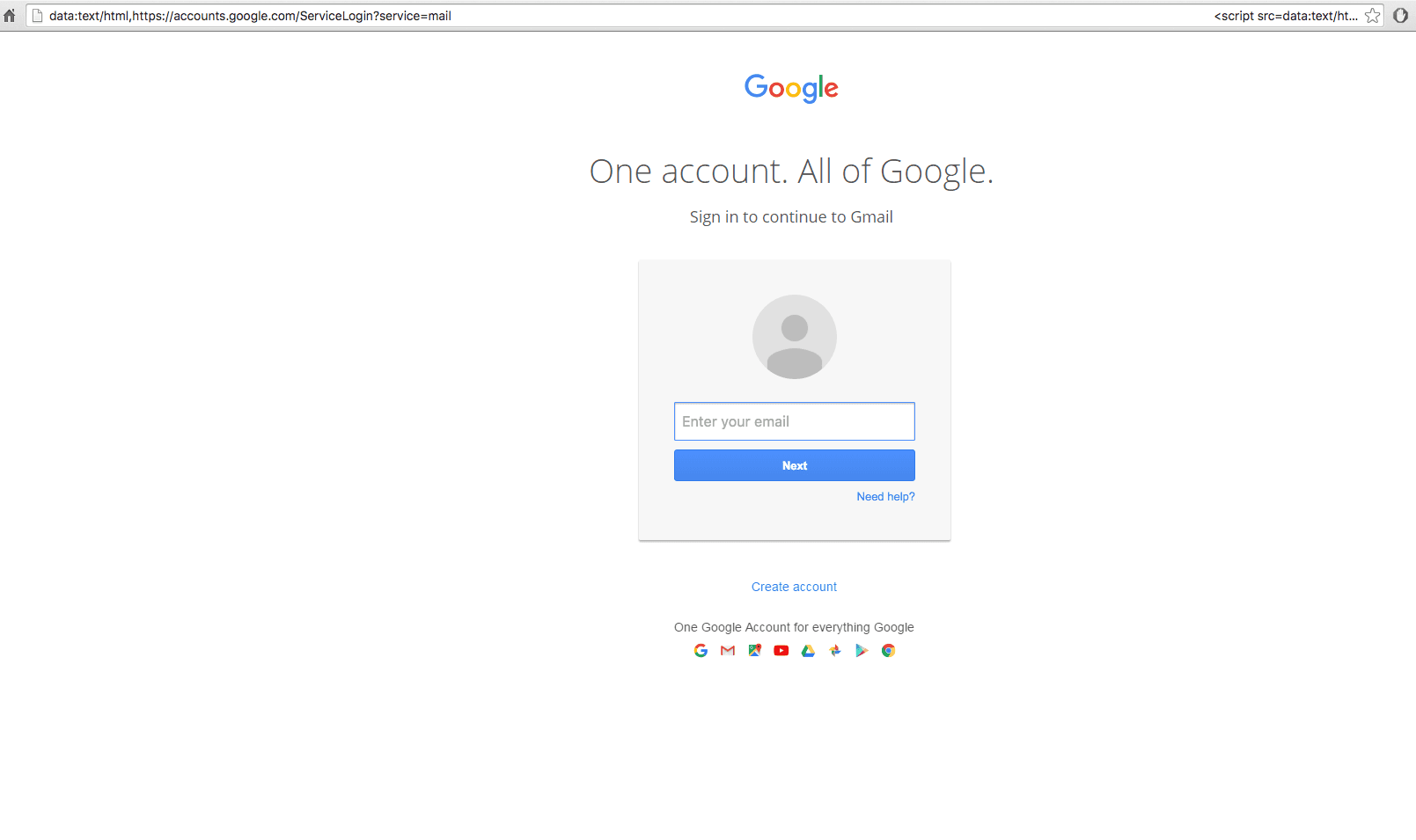
The URL to which the images of attachments point is crafted to appear legitimate:
“data:text/html,https://accounts/google.com,”
The web browser does not display any certificate warning, experts noticed that the apparently legitimate part of the URL is followed by white spaces, which prevent the victims from seeing suspicious strings and an obfuscated script that opens a Gmail phishing page in a new tab. A technical description of the Chrome/Gmail attack has been published on Github.

“You click on the image, expecting Gmail to give you a preview of the attachment. Instead, a new tab opens up and you are prompted by Gmail to sign in again. You glance at the location bar and you see accounts.google.com in there. It looks like this….” states a blog post published by WordFence. “Once you complete sign-in, your account has been compromised.”
This technique is not new, several victims reported similar attacks in July.
One of the main characteristics of the attacks that have been recently detected by the experts is that crooks immediately accessed the compromised accounts and used them to send out phishing emails to all the victim’s contacts. It is still unclear if the attackers have found a way to automate the process.
https://twitter.com/tomscott/status/812265182646927361
As usual, let me suggest to enable two-factor authentication (2FA) on Gmail in order to avoid being victims of this powerful phishing scheme. However, if the cyber criminals immediately access the compromised account they could also include in a phishing page the 2FA code.
“2FA would make it harder to exploit, but phishing attacks are getting fancier. They capture the 2FA code you enter and immediately start a session elsewhere with your password and 2FA. Hardware 2FA, a security key, (such as a Yubikey) is the only likely way to prevent phishing (excluding targets of state actors)” wrote a user in a discussion on Hacker News.
Google has been aware of this new phishing tactic at least March 2016, for this reason, the Chrome security team suggested introducing a “Not Secure” tag in the address bar for data:, blob: and other URLs that may be exploited by phishers in hacking campaigns.
[adrotate banner=”9″]
(Security Affairs – cybercrime, Gmail)