Microsoft warns of Android ransomware that activates when you press the Home button
Microsoft spotted a new strain of Amdroid ransomware tracked as MalLocker.B that activates when the users press the Home button.
Researchers from Microsoft spotted a new strain of Android ransomware that abuses the mechanisms behind the “incoming call” notification and the “Home” button to lock the screen on the victim’s device.
AndroidOS/MalLocker.B is distributed through tainted Android apps available for download on online forums and third-party websites.
The new variant also manages to evade many available protections, registering a low detection rate against security solutions.
Experts believe the malware is particularly sophisticated, but implements novel techniques and behavior.
Like other Android ransomware, MalLocker.B doesn’t actually encrypt the files on the devices but only inhibits the access to the phone.
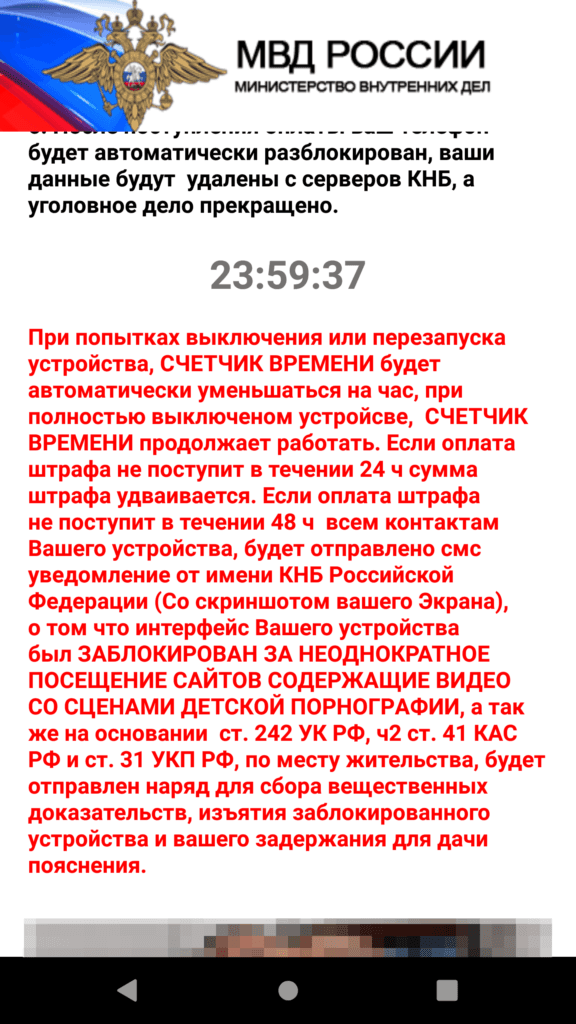
Once installed, the ransomware displays a ransom note on the phone’s screen and prevents the victim from dismissing. The ransom note pretends to be a message from Russian law enforcement notifying users they have violated the law and must compensate by paying a fine.

Across time, security firms have spotted multiple mobile malware strains that have abused various features implemented by the Android operating systems to lock out the owners of the devices. For example, in 2017 ESET experts observed the DoubleLocker that was both encrypting user data and changing PIN Lock and that abused the Accessibility service to re-activate itself after users pressed the Home button.
What’s innovative about the MalLocker.B ransomware is how it displays its ransom note.
In the past, Android ransomware used the “SYSTEM_ALERT_WINDOW” a special permission to display their ransom note.
This permission allows apps to draw a window that belongs to the system group and can’t be dismissed, independently from any button pressed by the victims.
The actual mechanism implemented by the MalLocker.B ransomware to display the ransom note is composed of two parts.
The first part abuses the “call” notification that activates for incoming calls to show info about the caller. The ransomware abuses this feature to show a window that covers the entire screen of the device. The second part abuses the “onUserLeaveHint()” function which is called when users want to push an app into the background and switch to a new app. This feature is triggered everytime the users press buttons like Home or Recents. MalLocker.B abuses this function to prevent the victims from leaving the ransom note for the home screen or another app.
“The malware connects the dots and uses these two components to create a special type of notification that triggers the ransom screen via the callback.” reads the analysis published by Microsoft. “As the code snippet shows, the malware overrides the onUserLeaveHint() callback function of Activity class. The function onUserLeaveHint() is called whenever the malware screen is pushed to background, causing the in-call Activity to be automatically brought to the foreground. Recall that the malware hooked the RansomActivity intent with the notification that was created as a “call” type notification. This creates a chain of events that triggers the automatic pop-up of the ransomware screen without doing infinite redraw or posing as system window.”
This is the first time that experts observed the concurrent abuse of these two features in a ransomware that hijacks the Home button.
In order to avoid being infected with MalLocker.B and similar malware users are advised to avoid installing Android apps from third-party stores or forums.
| [adrotate banner=”9″] | [adrotate banner=”12″] |
(SecurityAffairs – hacking, MalLocker.B)
[adrotate banner=”5″]
[adrotate banner=”13″]