Security Affairs
Dark Caracal Deploys New Go Malware With Ethereum-Based C2 Fallback|Australian Police Charge Two Over TeamPCP Credential Theft|Meta to Pay Up to $18B Over Teen Social Media Use|CISA Warns Water Utilities: Find Your Exposed PLCs Before Attackers Do|OpenAI banned Russian ChatGPT accounts backing covert influence operation|CISA Red Team Fully Compromised Two Critical Infrastructure Orgs|FBI Seizes China-Linked Hacking Platforms QScan and QTRouter Used Against Critical Infrastructure|U.S. CISA adds Gitea flaw to its Known Exploited Vulnerabilities catalog|88 ID Verification Breaches Show the Cost of Collecting Identity Data|WhatsApp Adds Stronger Security as Passkeys Hit 1 Billion|Operation Jackal: 58 Arrests Expose the Money Laundering Machine Behind Global Scams|Norway ’s Digital Government Infrastructure Hit by a new DDoS Attack|Dark Caracal Deploys New Go Malware With Ethereum-Based C2 Fallback|Australian Police Charge Two Over TeamPCP Credential Theft|Meta to Pay Up to $18B Over Teen Social Media Use|CISA Warns Water Utilities: Find Your Exposed PLCs Before Attackers Do|OpenAI banned Russian ChatGPT accounts backing covert influence operation|CISA Red Team Fully Compromised Two Critical Infrastructure Orgs|FBI Seizes China-Linked Hacking Platforms QScan and QTRouter Used Against Critical Infrastructure|U.S. CISA adds Gitea flaw to its Known Exploited Vulnerabilities catalog|88 ID Verification Breaches Show the Cost of Collecting Identity Data|WhatsApp Adds Stronger Security as Passkeys Hit 1 Billion|Operation Jackal: 58 Arrests Expose the Money Laundering Machine Behind Global Scams|Norway ’s Digital Government Infrastructure Hit by a new DDoS Attack|
Advertisement

Ad Placeholder

Full Width × 90

Cyber Crime

Kaspesky releases new tool to fix computers with CoinVault Ransomware

The victims of CoinVault ransomware can now decrypt the files encrypted by the malicious code by using a free removal tool released by Kaspersky firm. There is good news for you, dear reader, if you are facing this problem with CoinVault Ransomware, Kaspersky just found the solution to end your problems. Now it’s possible to […]

Kaspesky releases new tool to fix computers with CoinVault Ransomware

The victims of CoinVault ransomware can now decrypt the files encrypted by the malicious code by using a free removal tool released by Kaspersky firm.

There is good news for you, dear reader, if you are facing this problem with CoinVault Ransomware, Kaspersky just found the solution to end your problems.

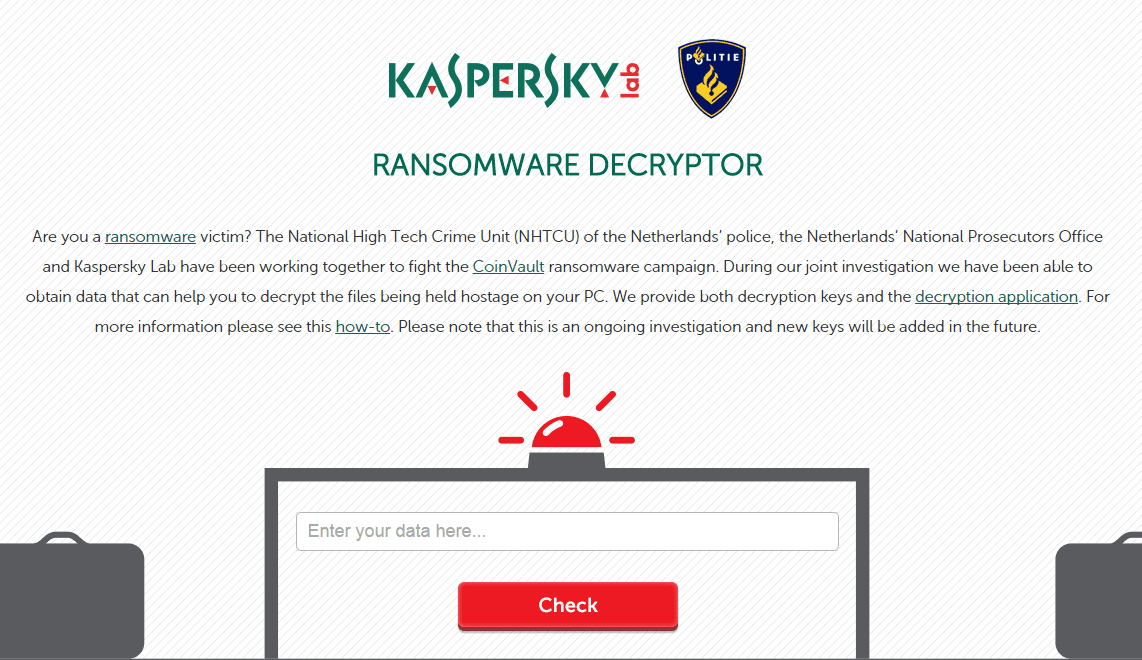
Now it’s possible to decrypt your files using a free tool released by Kaspersky Lab.

For the development of this tool called “CoinVault Ransomware Decryptor”, Kaspersky teamed up with The National High Tech Crime Unit (NHTCU) of the Dutch Police.

Has you may know, typically, the Ransomware family malware infects a computer and keeps users from accessing their computer files, and typically  you need to do a bitcoin payment to get back your info, but during investigations of the CoinVault, Dutch police obtained the Decryption keys from a  CoinVault’s database contained in a server.

CoinVault malware

For the provided tool created by Kaspersky labs, was using the same decryption keys discovered by the Dutch police, but there is a catch to it, even if you get the key you may not be able to get rid of the Coinvault, since the police only obtained a few thousand decryption keys, that said, it’s important to refer that the Dutch police continues seeking for more CoinVault servers in the search for more ransomware decryption keys.

Here you have the steps to use to tell provided by the colleagues at the TheHackNews :

  1. Step 1: If you are infected with CoinVault, just note down the Bitcoin wallet address mentioned by the malware on the screen.
  2.  Step 2: Get the encrypted file list from ransomware interface.
  3.  Step 3: Download an effective antivirus and remove CoinVault Ransomware first.
  4.  Step 4: Open https://noransom.kaspersky.com and download the decryption tool released by Kaspersky Labs.
  5.  Step 5: Install additional libraries and Decrypt your files.

In order to protect your computer from malware:

  • Ensure your system software and antivirus definitions are up-to-date.
  • Avoid visiting suspicious websites.
  • Regularly backup your important files to a separate drive or storage that are only temporarily connected.
  • Be on high alert for pop-ups, spam, and unexpected email attachments.

About the Author Elsio Pinto

Elsio Pinto is at the moment the Lead Mcafee Security Engineer at Swiss Re, but he also as knowledge in the areas of malware research, forensics, ethical hacking. He had previous experiences in major institutions being the European Parliament one of them. He is a security enthusiast and tries his best to pass his knowledge. He also owns his own blog http://high54security.blogspot.com/

Edited by Pierluigi Paganini

(Security Affairs –   CoinVault Ransomware, Removal tool)