Experts observed cybercriminals are conducting a new malspam campaign to distribute a new variant of the GlobeImposter ransomware
According to Lawrence Abrams from BleepingComputer, crooks are conducting a new malspam campaign to distribute a new variant of the GlobeImposter ransomware that appends the “..doc” extension to encrypted files.
The malicious messages pretend to have attached photos being sent to the recipient and have a subject line similar to “Emailing: IMG_20171221_”.

The messages include 7zip (.7z) archive attachments that are named after a camera photo’s filename such as IMG_[date]_[number]. The archive contains an obfuscated .js file, when victims double-click on will trigger the downloading of GlobeImposter ransomware from a remote server and execute it.
“After the executable is downloaded, it will be executed and the GlobeImposter ransomware will begin to encrypt the computer. When encrypting files on the computer it will append the ..doc extension to encrypted file’s name. For example, a file called 1.doc would be renamed to 1.doc..doc.” states the analysis published by Abrams.
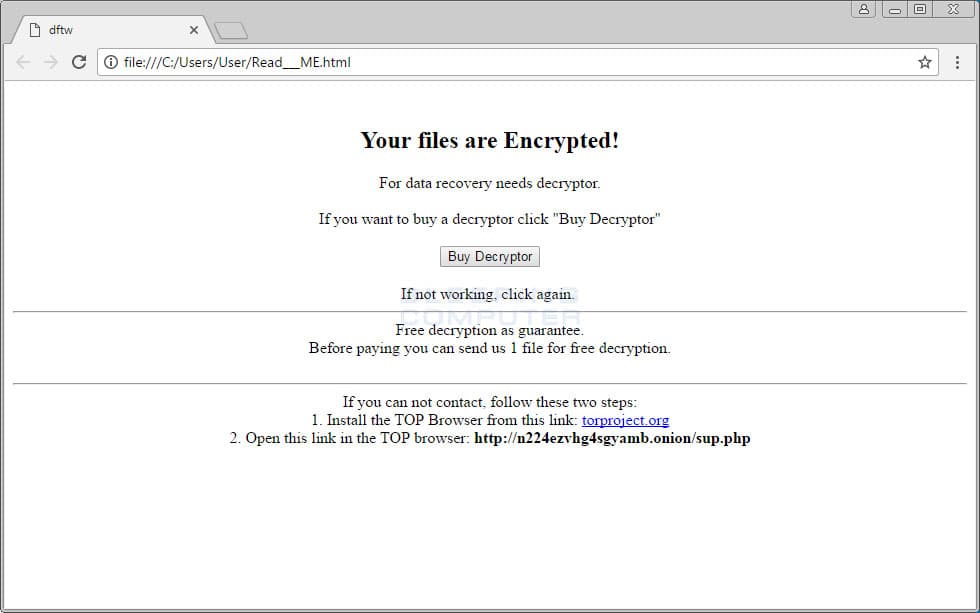
Once encrypted the files, the GlobeImposter ransomware create a ransom note named Read___ME.html in each folder a file is encrypted. Victims are instructed to visit the http://n224ezvhg4sgyamb.onion/sup.php onion site that provides an email address to contact (server5@mailfence.com) to receive payment instructions and to decrypt one file for free. The note also includes a link to a support website that can be used by victims to send messages to the cyber criminals.

Below the list of recommendations provided by the experts to protect your system from ransomware attacks.
- Backup, Backup, Backup!
- Do not open attachments if you do not know who sent them.
- Do not open attachments until you confirm that the person actually sent you them.
- Enable the showing of file extensions.
- If an attachment ends with .js, .vbs, .exe, .scr, or .bat, do not open them for any reason.
- Scan attachments with tools like VirusTotal.
- Make sure all Windows updates are installed as soon as they come out! Also make sure you update all programs, especially Java, Flash, and Adobe Reader. Older programs contain security vulnerabilities that are commonly exploited by malware distributors. Therefore it is important to keep them updated.
- Make sure you use have some sort of security software installed that uses behavioral detections or white list technology. White listing can be a pain to train, but if your willing to stock with it, could have the biggest payoffs.
- Use hard passwords and never reuse the same password at multiple sites.
If you are interested in Indicators of Compromise give a look at the blog post.
| [adrotate banner=”9″] | [adrotate banner=”12″] |
(Security Affairs – GlobeImposter ransomware, cybercrime)
[adrotate banner=”5″]
[adrotate banner=”13″]